KMPlayer 去廣告
C:\Windows\System32\drivers\etc\hosts
在host檔增加 127.0.0.1 player.kmpmedia.net
原文來自
http://chenglearning.blogspot.tw/2013/10/kmplayer.html
2015年2月12日 星期四

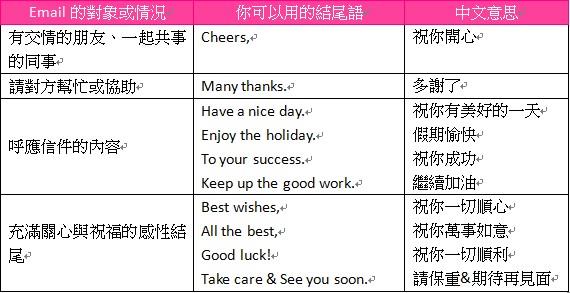
E-Mail 結尾語的選用
E-Mail 結尾語的選用
原來有這麼多種
請自行參考 商業周刊的原文
http://www.businessweekly.com.tw/KBlogArticle.aspx?ID=2010&pnumber=4

原來有這麼多種
請自行參考 商業周刊的原文
http://www.businessweekly.com.tw/KBlogArticle.aspx?ID=2010&pnumber=4
使用 FVD Downloader卻無法下載影片的問題
使用 FVD Downloader卻無法下載影片的問題
1: Chrome 安裝
https://chrome.google.com/webstore/category/apps
2:
FVD 選項要都打勾
(有時 FVD 的版本更新, 這些選項就都不見)
3:
先刪除 Chrome 的 Cache
C:\Users\XXX\AppData\Local\Google\Chrome\User Data\Default\Application Cache\Cache
C:\Users\XXX\AppData\Local\Google\Chrome\User Data\Default\Cache
在重新讀取網頁, 按F5 refresh

1: Chrome 安裝
https://chrome.google.com/webstore/category/apps
2:
FVD 選項要都打勾
(有時 FVD 的版本更新, 這些選項就都不見)
3:
先刪除 Chrome 的 Cache
C:\Users\XXX\AppData\Local\Google\Chrome\User Data\Default\Application Cache\Cache
C:\Users\XXX\AppData\Local\Google\Chrome\User Data\Default\Cache
在重新讀取網頁, 按F5 refresh
2015年2月11日 星期三
Qt5.4 QApplication no such file or directory
Qt5.4 for Windows
Error c1083: Cannot open include file: QApplication: no such file or directory
範例為: MDI Example
http://doc.qt.io/qt-5/qtwidgets-mainwindows-mdi-example.html
原文在 http://qt-project.org/forums/viewthread/23804
修改 *.pro檔案
QT += qml quick widgets
或者是
QT += core gui widgets

2015年2月9日 星期一
Qt5.4 Windows關於"no debugger set up"的問題
Qt5.4 Windows 關於 "no debugger set up"的問題
在 Qt 5 Creator 進行 Debug 動作.
發生 "no debugger set up" 訊息
會無法進行 Step by Step Debug
解決方法:
因為不同的 Visual Studio, 好像問題都不同
原則上, 一定是出現下面的問題
原因不知為什麼, 只是做了下面的這些事, 就可以了.
懶得花時間找出真正的原因
- 本人是在 Win7x64 平台 + Visual Studio 2013
- 請安裝 Windows SDK 7.1
如果已安裝 Windows SDK 7.0, 也請重新安裝
如果安裝失敗, 請看下面的網址
簡單的說, 就是 Visual C++ 2010 Redistributable 的版本錯誤
- 檢查 cdb.exe 是否存在
一般是安裝於下面這目錄下
C:\Program Files\Debugging Tools for Windows (x64)
- 如果是 Visual Studio 2010 請更新到 2010 SP1
- 請安裝 Visual Studio 2010 SP1 Redistributable package
相關資訊
- Download Windows SDK 7.1 ISO
http://www.microsoft.com/en-us/download/details.aspx?id=8442
-
http://qt-project.org/wiki/Building-Qt-5-from-Git
Supported Compilers on Windows
- Windows SDK installation failed on Windows 7 and shows the error below.
http://qt-project.org/wiki/Cannot_Install_Windows_SDK


在 Qt 5 Creator 進行 Debug 動作.
發生 "no debugger set up" 訊息
會無法進行 Step by Step Debug
解決方法:
因為不同的 Visual Studio, 好像問題都不同
原則上, 一定是出現下面的問題
原因不知為什麼, 只是做了下面的這些事, 就可以了.
懶得花時間找出真正的原因
- 本人是在 Win7x64 平台 + Visual Studio 2013
- 請安裝 Windows SDK 7.1
如果已安裝 Windows SDK 7.0, 也請重新安裝
如果安裝失敗, 請看下面的網址
簡單的說, 就是 Visual C++ 2010 Redistributable 的版本錯誤
- 檢查 cdb.exe 是否存在
一般是安裝於下面這目錄下
C:\Program Files\Debugging Tools for Windows (x64)
- 如果是 Visual Studio 2010 請更新到 2010 SP1
- 請安裝 Visual Studio 2010 SP1 Redistributable package
相關資訊
- Download Windows SDK 7.1 ISO
http://www.microsoft.com/en-us/download/details.aspx?id=8442
-
http://qt-project.org/wiki/Building-Qt-5-from-Git
Supported Compilers on Windows
- Windows SDK installation failed on Windows 7 and shows the error below.
http://qt-project.org/wiki/Cannot_Install_Windows_SDK
2015年2月4日 星期三
Linux 下編寫程式的等寬字型(Monospaced Font)
Linux 下編寫程式的等寬字型(Monospaced Font)
原來不一定要安裝 M$相容的 Courier New 字型
請參考下面這篇
http://free.com.tw/monospaced-font-for-programmers/
例如使用 terminus 字型
sudo apt-get install xfonts-terminus
原來不一定要安裝 M$相容的 Courier New 字型
請參考下面這篇
http://free.com.tw/monospaced-font-for-programmers/
例如使用 terminus 字型
sudo apt-get install xfonts-terminus
2015年1月28日 星期三
關於 Linux 下開發程式
關於 Linux 下開發程式
說真的, 我這種在 Windows 下寫程式寫了幾十年的人
回到 Linux 環境下, 真的很不習慣
剛是開發工具就覺得超及麻煩的
Embarcadero (Borland) 為何不早點開發出一套 C++ Builder for Linux 呢?
使用過 C++ Builder, 我可以把大部份的時間
專心的用在核心程式處理
客戶想改GUI, 我隨時可以很快改好
使用 MSVC 這類, 我每次都說, 別修改好嗎? 饒了我吧!
Eclipse也用了很多年,
但是 Eclipse 寫 None GUI 程式, 超及好用
但是加上 GUI 就....
實在想不出要用那一套
都什麼時代了, 純 SDK 方式, 不想這樣玩了, 太累了,
Eclipse + QT5 現在還沒有整合好的
內地有人有解決方案
但我覺得還是不好用.
直接用 QT5 Creator 是現在比較好的解決方案
初學者的我, 還需要一段時間來學習.
說真的, 我這種在 Windows 下寫程式寫了幾十年的人
回到 Linux 環境下, 真的很不習慣
剛是開發工具就覺得超及麻煩的
Embarcadero (Borland) 為何不早點開發出一套 C++ Builder for Linux 呢?
使用過 C++ Builder, 我可以把大部份的時間
專心的用在核心程式處理
客戶想改GUI, 我隨時可以很快改好
使用 MSVC 這類, 我每次都說, 別修改好嗎? 饒了我吧!
Eclipse也用了很多年,
但是 Eclipse 寫 None GUI 程式, 超及好用
但是加上 GUI 就....
實在想不出要用那一套
都什麼時代了, 純 SDK 方式, 不想這樣玩了, 太累了,
Eclipse + QT5 現在還沒有整合好的
內地有人有解決方案
但我覺得還是不好用.
直接用 QT5 Creator 是現在比較好的解決方案
初學者的我, 還需要一段時間來學習.
訂閱:
文章 (Atom)